ZalDo
Azure Weekly Newsletter, Zaldo. Curated Azure news, tutorials, tools and more!
⭐ Sponsors
faun.dev
Kala is designed specifically for AI/ML developers & enthusiasts and will feature a wide range of tutorials, news, tools, libraries, and more, including updates about OpenAI ChatGPT, Google Bard,and everything you may care about as a developer!
In order to join this weekly newsletter:
In order to join this weekly newsletter:
- Login or signup .
- Go to your Newsletter Settings .
- Update the topics you'd like to subscribe to.

www.buymeacoffee.com
FAUN is funded through crowdfunding and carefully chosen advertising. Both are critical for advancing our mission to give our community members the best experience possible.
Join other members who are already supporting us!
Join other members who are already supporting us!

🔗 Stories, Tutorials & Articles
maltheborch.com
In this article, the author explains how to use Apache Airflow for orchestration of Windows jobs through PowerShell Remoting on Windows using WinRM (Windows Remote Management).
To ensure security, the author recommends using the Just-Enough-Administration (JEA) framework, which is essentially a more advanced version of sudo and allows you to use PowerShell as an API, limiting the remote management interface to a defined set of commands and executing as a specific user.
The author explains how to register a JEA configuration and make it available to Airflow by creating a role capabilities file. The author also mentions the steps to add the PowerShell Remoting Protocol Provider to Airflow and the necessary Python packages to be installed, including apache-airflow-providers-microsoft-psrp, gssapi and krb5.
They conclude by noting that when WinRM is used with an HTTP listener, Kerberos authentication can be used to secure the communication, acting as a trusted third party, supplanting the use of SSL/TLS.
To ensure security, the author recommends using the Just-Enough-Administration (JEA) framework, which is essentially a more advanced version of sudo and allows you to use PowerShell as an API, limiting the remote management interface to a defined set of commands and executing as a specific user.
The author explains how to register a JEA configuration and make it available to Airflow by creating a role capabilities file. The author also mentions the steps to add the PowerShell Remoting Protocol Provider to Airflow and the necessary Python packages to be installed, including apache-airflow-providers-microsoft-psrp, gssapi and krb5.
They conclude by noting that when WinRM is used with an HTTP listener, Kerberos authentication can be used to secure the communication, acting as a trusted third party, supplanting the use of SSL/TLS.
askaresh.com
The article is about how to use Microsoft Intune Compliance Policy to manage the security and compliance of Azure Virtual Desktop (AVD) Session Host virtual machines.
It explains the steps to set up an Intune Compliance Policy, the reasons why organizations create such policies, the compliance policies supported by Azure Virtual Desktop, and the configuration options. The article also covers the process of creating the compliance policy and monitoring device compliance for AVD Session Host virtual machines.
It explains the steps to set up an Intune Compliance Policy, the reasons why organizations create such policies, the compliance policies supported by Azure Virtual Desktop, and the configuration options. The article also covers the process of creating the compliance policy and monitoring device compliance for AVD Session Host virtual machines.
medium.com
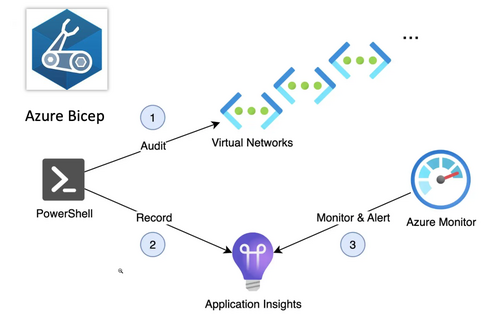
The article is about automating the tracking of Azure Virtual Network IP addresses consumption every 30 minutes through a Timer Trigger Azure Function App. The Azure Function will be deployed through Bicep, which is a domain-specific language that uses declarative syntax to deploy Azure resources and offers the best authoring experience for infrastructure-as-code solutions in Azure. The article is a continuation from part 1 where it showed how to send a custom event telemetry to an Azure Application Insights instance through PowerShell.
azure.microsoft.com
In order to deal with outbound connectivity issues encountered when handling large scale outbound traffic in Azure, NAT Gateway can be used in combination with Azure Firewall. Azure Firewall inspects, secures, and conceals the original client IP address of all outbound internet traffic using SNAT (Source Network Address Translation). However, large-scale environments can experience SNAT port exhaustion, where all available SNAT ports run out.
This can be solved by using NAT Gateway, which provides a large SNAT port inventory with fewer public IPs and is designed to handle dynamic and large-scale workloads by allocating SNAT ports on demand and randomly selecting them. NAT Gateway also provides 50 Gbps of data throughput for outbound traffic and ensures that all outbound traffic is secure by subjecting inbound traffic to security rules set on Azure Firewall.
To set up NAT Gateway with Azure Firewall, the firewall should be deployed to a subnet within the virtual network, and the NAT Gateway should be attached to the Firewall subnet and given up to 16 public IP addresses.
This can be solved by using NAT Gateway, which provides a large SNAT port inventory with fewer public IPs and is designed to handle dynamic and large-scale workloads by allocating SNAT ports on demand and randomly selecting them. NAT Gateway also provides 50 Gbps of data throughput for outbound traffic and ensures that all outbound traffic is secure by subjecting inbound traffic to security rules set on Azure Firewall.
To set up NAT Gateway with Azure Firewall, the firewall should be deployed to a subnet within the virtual network, and the NAT Gateway should be attached to the Firewall subnet and given up to 16 public IP addresses.
azure.microsoft.com
Azure DDoS Protection Solution for Microsoft Sentinel is a security solution offered by Microsoft Azure to help organizations protect their resources and applications from DDoS (Distributed Denial of Service) attacks.
Azure DDoS Protection Solution for Sentinel provides a single consumable solution package that includes an Azure DDoS Protection data connector and workbook, alert rules to retrieve the source of the DDoS attack, and a remediation IP playbook that automatically creates remediation in Azure Firewall to block the source of the attack. The solution is integrated with Microsoft Sentinel, a cloud-native security information and event management (SIEM) solution, to provide a centralized view of the attack landscape and automate the response to mitigate sophisticated attacks.
The solution is initially released for Azure Firewall and will be enhanced to support Azure Web Application Firewall (WAF) soon. The flexibility of the solution allows customers to use it with any firewall as long as it has a Sentinel Playbook. The solution provides an automated response to mitigate DDoS attacks and provides better security for organizations by blocking possible new attack vectors in other security products.
Azure DDoS Protection Solution for Sentinel provides a single consumable solution package that includes an Azure DDoS Protection data connector and workbook, alert rules to retrieve the source of the DDoS attack, and a remediation IP playbook that automatically creates remediation in Azure Firewall to block the source of the attack. The solution is integrated with Microsoft Sentinel, a cloud-native security information and event management (SIEM) solution, to provide a centralized view of the attack landscape and automate the response to mitigate sophisticated attacks.
The solution is initially released for Azure Firewall and will be enhanced to support Azure Web Application Firewall (WAF) soon. The flexibility of the solution allows customers to use it with any firewall as long as it has a Sentinel Playbook. The solution provides an automated response to mitigate DDoS attacks and provides better security for organizations by blocking possible new attack vectors in other security products.
📺 Quick Hits
Most Web services that were hit by the outage of Microsoft Azure’s cloud services on Wednesday (Feb 8) are back online after power was restored to affected sections of its infrastructure.
Microsoft has explained what caused the Azure outage last week on Wednesday (Feb 8). The outage made parts of Azure, Microsoft 365, and Power Platform inaccessible.
⭐ Supporters
www.youtube.com
Every day, we publish a short video to answer questions such as:
Join FAUN on Youtube!
- Why Kubernetes in Written in Go
- Go vs. Rust, Which is Better?
- Is Quantum Computing a Threat to Bitcoin?
- What are the Worst Mistakes in Computer Science?
Join FAUN on Youtube!

faun.dev
Meet developers where they are, not where you want them to be. Fill out the form and download our mediakit .

📚 Book picks

www.amazon.com
John uses a simple style to teach topics that you never knew you needed. This isn’t theory, it’s proven through the results that let him retire at 33-years old.
You’ll learn:
You’ll learn:
- Ways To Land The Job, Keep The Job And Climb The Corporate Ladder
- How To Stand Out From Your Competition
- 10-Step Process To Learn Anything
- What To Do With Your Paycheck to Maximize Your Earnings
- Why Healthy Living and Exercise are Crucial
- Ways to Build Your Brand

⚙️ Tools, Apps & Software
github.com
Google Cloud Security Command Center to Azure Sentinel Connector
github.com
A collection of awesome .NET core libraries, tools, frameworks and software
github.com
Automate Reporting of Defender for Cloud recommendations & Role Assignments with 35 different views
github.com
MAAD Attack Framework - An attack tool for simple, fast & effective security testing of M365 & Azure AD.
🤔 Did you know?
The first computer mouse was invented by Douglas Engelbart in 1963.
😂 Meme of the week